Equipment page · Printer / delivery platform hardware

Uber Eats Star Micronics TSP100IIIBI printer

Dedicated troubleshooting page for the Uber Eats kitchen ticket printer at Bunk Derby. Deliveroo has its own printer/tablet nearby and is not showing the issue.

Venue
Bunk Derby
Location
Kitchen delivery station
Category
Printer / EPOS
Make / model
Star Micronics TSP100IIIBI
Interface
Bluetooth
Serial
2550420091302345
Status
Resolved for now

Search this equipment page

Find symptoms, settings, checks, or handover text

Streamlined issue brief

Feed jam / partial print · Uber Eats printer

Resolved issue summary for future repeat faults.

Resolved / monitorRepeat Feed-button self-test reset up to 3 times

1. Symptoms and evidence

  • Uber Eats printer jammed/stuck and partial printed.
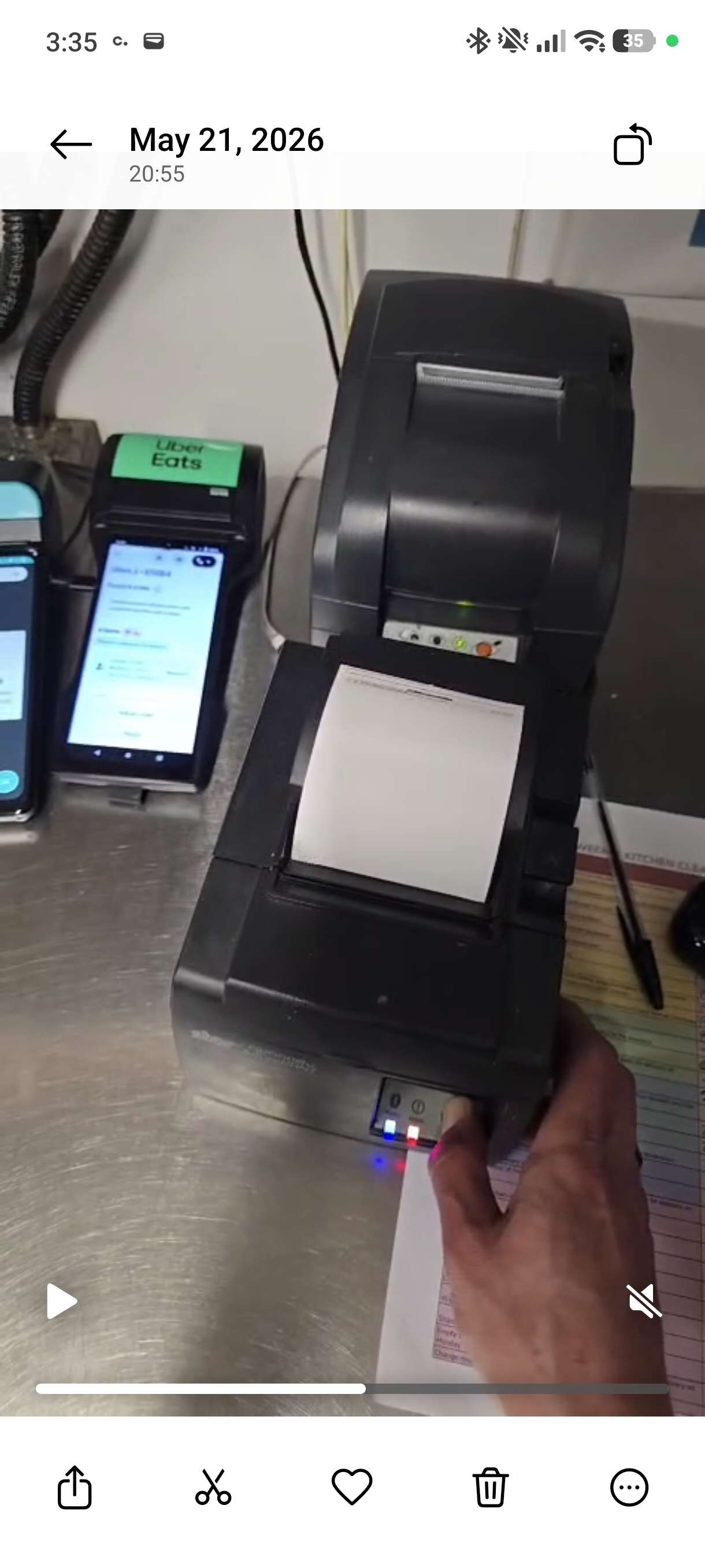
  • Orange/error light came on during fault.
  • Deliveroo printer/tablet at same station was not affected.
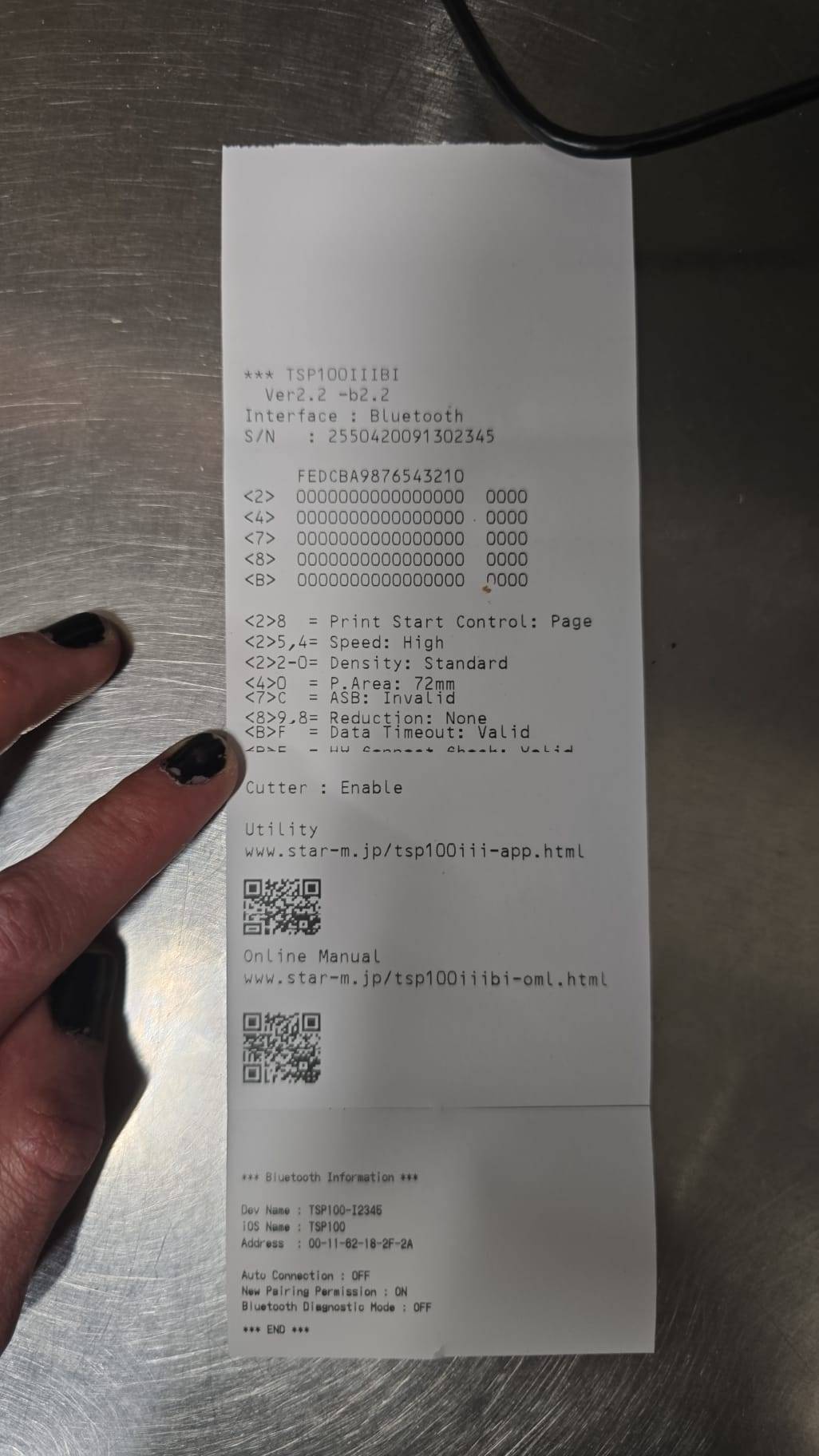
  • Settings print confirms Star Micronics TSP100IIIBI Bluetooth printer.

2. Suspects

  • Paper feed/cutter path jam.
  • Paper roll alignment or poor roll quality.
  • Printer state/error latch needing reset.
  • Uber tablet/app/Bluetooth issue if self-test works but app tickets fail.

3. Expand resources

Manual / how-to / error reference

Use the settings/self-test print on this page for model/interface details and current printer settings.

Troubleshooting tests
  1. Power off.
  2. Hold Feed while turning printer on.
  3. Let self-test/settings print start.
  4. Repeat up to 3 times if needed.
  5. Test Feed-only, then test an Uber ticket.
Diagram / parts / sources

Check paper roll, paper path, lid latch, cutter area and power supply before ordering parts.

4. Updated solution/status

Resolved for now: repeating the Feed-button power-on self-test reset three times got the printer working again.

Issue history for this printer

Choose the problem type

Only the partial print/feed jam issue is logged so far. Future Uber printer issues can be added below this same equipment page.

Resolved for now · 2026-05-22

Partial print / feed jam / orange error light

Printer started working again after repeating the power-on Feed/self-test reset cycle three times. Monitor for recurrence.

Open troubleshooting log

Bluetooth / pairing

No separate issue logged yet.

Paper roll / paper quality

No separate issue logged yet.

Cutter fault

Possible cause in current issue; no confirmed separate fault yet.

App / Uber ticket formatting

Possible cause if self-test/feed are clean.

Power / adapter

No issue logged yet.

Resolved issue log · Partial print / feed jam

Uber Eats printer partial print / feed jam at Bunk Derby

Kitchen has both Uber Eats and Deliveroo printer/tablet setups. The issue was isolated to Uber Eats and is now working again after repeated self-test/feed resets.

Confirmed details

Venue
Bunk Derby
Area
Kitchen / delivery order station
Equipment
Uber Eats ticket printer and tablet
Model
Star Micronics TSP100IIIBI
Interface
Bluetooth
Serial
2550420091302345
Settings
Speed high; density standard; print area 72mm; cutter enabled
Status
Resolved for now — 3 self-test resets got it working

Current interpretation

  • Self-test/settings page prints when holding Feed while powering on.
  • Orange/error indicator lights when the feed starts to jam or get stuck.
  • Turning printer off, holding Feed, and powering back on printed the settings/self-test page.
  • Repeating that self-test/feed reset sequence three times got the printer working again.
  • Deliveroo printer/tablet is unaffected, so compare paper roll/app behaviour against that setup if compatible.

Meaning: the fault appears recoverable rather than fully failed hardware. It may have been a cutter/feed/sensor state, minor paper path drag, or stuck print job/Bluetooth/app state. If it returns, repeat the proven reset first, then inspect paper path/cutter/roller/lid latch.

Proven reset loop

Repeat this if the fault comes back

  1. Turn printer off. Wait 10 seconds. Do not pull the paper while powered.
  2. Hold the Feed button down.
  3. Turn printer back on while still holding Feed. Keep holding until the self-test/settings print starts, then release.
  4. Repeat up to three times. This cleared the fault on 2026-05-22.
  5. Test an Uber ticket. If it prints normally, leave it in service and monitor.
  6. If it fails again: reload paper straight, check cutter/paper path, press Feed several times, try a fresh compatible roll, then restart Uber tablet/app and check Bluetooth pairing.

Orange/error light

What to record next time it fails

  • Is the orange light solid or flashing?
  • Does the blue power light stay on?
  • Does the printer stop at the cutter area or before it?
  • Does opening/closing the lid clear the error?
  • Does a self-test immediately after the error print normally?

If the same fault keeps returning: clean thermal head, black rubber platen roller, paper sensor, and cutter mouth with isopropyl alcohol. If still recurring, likely worn roller/cutter/sensor/latch or replacement printer required.

Photos / evidence
Printer evidence images

Star Micronics TSP100IIIBI self-test settings print from Uber Eats printer
Self-test/settings print confirming Star Micronics TSP100IIIBI, Bluetooth, serial 2550420091302345, 72mm print area, cutter enabled.
Uber Eats printer orange error light during jam
Screenshot showing orange/error light when the printer starts jamming or getting stuck.

Staff / engineer handover

Copy-and-paste details

Use this when asking staff to keep testing or when sending to an engineer/supplier.

Need to confirm

  • Bunk Derby full address/directions for engineer handover.
  • Whether orange light is solid or flashing.
  • Whether repeated Feed-only/self-test prints jam.
  • Whether changing paper roll helps.
  • Whether Uber app restart/Bluetooth re-pairing helps if self-test is clean.

Copy message